
Before playing
- Use an updated browser such as Chrome, Edge, Firefox or Safari.
- Enable JavaScript — our games need it to run.
- Use a stable connection while the game loads. Once loaded, the game runs in your browser.
- Check the individual game's instructions further down this page for controls and tips.
Playing with a keyboard or touch screen
On a computer, some Gaimo games are played with the keyboard and others with the mouse. Click inside the game area first so it receives your key presses. On phones and tablets, games that support touch can be played by tapping and dragging on the screen.
Games pause automatically when you switch to another tab or window, so you won't lose progress if you are interrupted.
Frog's Way Home
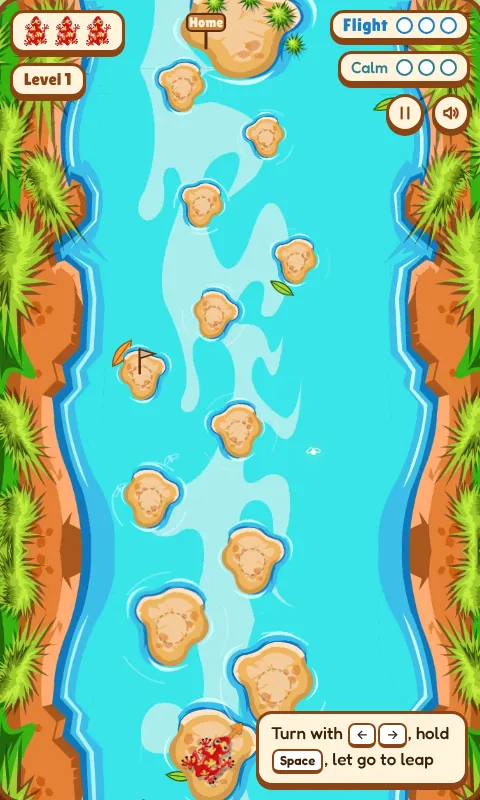
Frog's Way Home is an arcade-style browser game focused on timing, movement and precision. Guide the frog across a flowing river while carefully choosing where and when to jump.
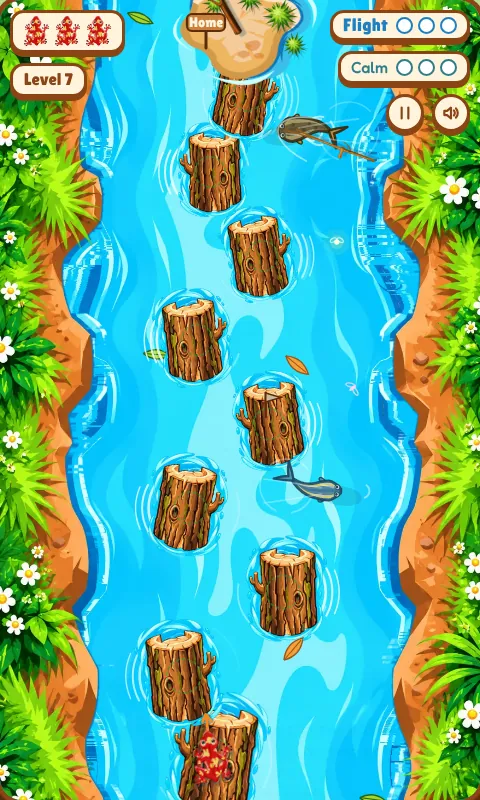
The river is full of surprises. Stones slide from side to side, the current pushes your leaps downstream, branches drift past, snakes patrol the water and, in later levels, logs roll under your feet while fish leap out of the river. Levels 11 to 15 move the crossing into a narrow forest stream, where the stones give way to slippery earthen mounds, snakes strike from burrows in the banks, ants swarm along branches over the water, and hawks, low-flying birds and whirlpools join the hunt. Each of the fifteen levels adds a new twist, so the game grows with your skill.
Objective
Safely guide the frog through the river and reach home on the far bank to complete the level, while avoiding dangerous areas and failed landings.
You have three chances per crossing. Missing a stone sends the frog into the water, and a splash can wake the snakes. In the forest stream every fall, strike or snatch costs one of the three chances. On longer crossings, a halfway flag lets you retry from the middle of the river instead of starting over. Your best crossing time for each level is saved so you can try to beat it.
How to play
Observe the next stone, adjust the frog's direction, charge your jump and release at the right moment. Try to land near the centre of each stone for better control.
- Choose a level on the start screen and press Start. New levels unlock as you complete the previous one.
- Aim the frog towards the next stone by turning left or right.
- Charge the jump. Hold the jump key and watch the landing marker travel forward. It slows down as it passes over a stone.
- Release to leap when the marker sits on the centre of the stone.
- Land accurately to build a streak of perfect landings and charge Water Flight.
- Catch fireflies to charge Calm Water, then use your abilities on the hardest sections.
- On earthen mounds (levels 11–15), land inside the dotted centre ring. Off-centre the mud slides — lean the other way to hold on, or leap off before it throws you in.
- Reach home on the far bank to complete the level.
Controls
| Key | Action |
|---|---|
| ← → or A D | Turn the frog. On a wobbling stone or sliding mud, lean against the slide. |
| Hold Shift | Make smaller, more precise turns |
| Space, ↑ or W | Hold to charge the jump, release to leap |
| ↓ or Esc | Cancel a jump charge |
| B | Use Water Flight (levels 1–10, when charged) or arm Water Dash (levels 12–15) |
| C | Use Calm Water (levels 1–10, when charged) |
| G | Precision Glide, pressed in mid-air (levels 13–15) |
| L | Switch between normal and low hops (levels 13–15) |
| P | Pause and resume |
| M | Sound on / off |
| N | Music on / off |
| 1–9 | Pick an unlocked level on the start screen |
Touch: on phones and tablets, drag from the frog to aim and set the distance, then let go to leap. When an ability is ready, an on-screen button appears — tap it to use Water Flight or Calm Water. In levels 12–15 the Dash, Glide and Low buttons sit on the left bank, and two lean arrows appear while the mud is sliding. The pause, sound and music buttons sit in the top-right corner.
Special abilities
Water Flight: successful accurate landings charge Water Flight. Land three perfect jumps in a row to fill the Flight meter. When it is ready, Water Flight lets the frog travel above the water for a short time, carrying it up to three stones forward in one go — perfect for skipping a dangerous stretch.
Calm Water: fireflies sometimes drift over the river. Catch three of them to fill the Calm meter. Calm Water makes the river hold still for a few seconds: logs stop sliding, the current eases and everything in the water slows to a crawl.
In the forest stream (levels 11–15), Water Flight and Calm Water give way to two new abilities that share one Energy bar. Perfect landings refill it, and a streak of them refills it faster.
Water Dash (from level 12): arm it, then leap as usual. That leap skims low over the water, flies 35% farther and lands fast — ideal for escaping a sliding mound or crossing a dangerous gap. It costs half the bar and needs a short recharge. You still have to land in the centre.
Precision Glide (from level 13): press it while the frog is in the air to brake and float gently down, so a leap that would overshoot lands short instead. With the keyboard you can steer the descent a little. It costs less energy than a dash but does not hide you from hawks.
Low hops (from level 13): flatter leaps with a shorter reach. They stay under low branches and below the height that draws a circling hawk's attention.
Levels
Frog's Way Home has fifteen levels. Each one introduces a new challenge:
- 1The first crossingLearn the hops. Two snake lanes.
- 2Sliding stonesEvery stone slides side to side. Time your leaps.
- 3Snake seasonSliding stones, wider gaps and more snakes.
- 4Fast waterA fast river pushes your leaps downstream. Every fall costs one of your three chances.
- 5Branches & rapidsStones slide both ways and branches drift down the river.
- 6Rolling logsFloating logs roll and slide — land dead centre or the frog slips off.
- 7Fish runA zig-zag crossing, with fish darting between the logs.
- 8Leaping fishThree long gaps, then a tight cluster — and fish start leaping from behind.
- 9Fish swarmThe logs march across the river while groups of fish leap at you.
- 10The schoolA gauntlet of fast, wide-swinging logs, and a whole school of fish leaping at you.
- 11The slippery crossingEarthen mounds that only hold a centre landing, snakes that strike from bank burrows across tight groups of mounds, and branches crawling with ants.
- 12The rising splashAfter the second mound a school of fish bursts out, and the water starts to boil in waves that wash frogs off the mounds. Water Dash arrives.
- 13The sky huntersA hawk circles the open water and dives on any leap that climbs too high. Low hops and Precision Glide arrive.
- 14The low-flight gauntletBirds skim the water across, along and over the mounds. Land clean and leap again before they reach you.
- 15The vanishing earthWhirlpools swell and fade, sinking the mounds beside them — then a final escape as the last mounds vanish one by one.
Tips
- Aim for the centre of stones — centre landings are the safest and count as perfect.
- Don't rush difficult jumps. Wait for a sliding stone to come towards you.
- Watch distances carefully; the landing marker slows down over a stone to help you.
- Build accurate landing streaks to charge Water Flight.
- Use Water Flight strategically to skip the most dangerous section of the river.
- Save Calm Water for fast currents, rolling logs and groups of leaping fish.
- In fast water, the current pushes your leap downstream — aim slightly upstream.
- On mounds, the dotted ring is the only safe spot. Short, careful leaps beat long gambles.
- A shaking burrow means its snake is about to sweep every mound ringed in red. Wait on the mound before the group, then cross right after it passes.
- When a branch crosses your path, the aim guide shows a green tick if you will pass under it and a red cross if you won't.
- Under a circling hawk, keep the power ring out of the red, use low hops, or wait for the hawk to glide away.
- Whirlpools follow a steady rhythm. Watch one swell and fade once before trusting the mound beside it.
Screenshots

Feedback
Found a bug or have an idea to improve the game? Contact sudhamsuvamadev@gmail.com. For bug reports, please include your device, browser and a short description of what happened.
Alien Clash: Color Chaos
Alien Clash: Color Chaos is a 3D puzzle game about wobbly, wide-eyed aliens who each want a friend of the same colour. They never stop moving: they hop, waddle, glide and wander around a floating island arena, and they get into trouble when nobody is watching.
Your job is to gather them into calm colour groups before trouble turns into lightning. Each of the ten levels adds something new, from a gentle first contact to rifts, live floors, moving mazes, portals and a final arena-wide energy surge.
Objective
Make every colour group listed at the top of the screen. Each badge shows how many aliens of that colour a group needs and how many groups are still to go. When every group is calm, the level is complete.
An alien that stays in trouble for ten seconds is struck by lightning. Each level allows a few losses (shown as small alien faces in the top-left corner); lose more and the level fails. If an alien is lost, its colour simply needs a smaller group, but a colour with only one alien left can no longer be grouped. Levels 8 to 10 also have a time limit.
How to play
- Press Play on the title screen to start the next level, or choose any unlocked level from Levels.
- Read the goals on the level card: which colours to group and how many aliens each group needs.
- Drag an alien and drop it right next to an alien of the same colour. They link up and hold hands; a small badge shows how many more are needed.
- Complete the group. When enough aliens are linked, they settle into a formation, glow in their colour and stay calm and safe.
- Watch for trouble. An alien that glows blue is in danger. Drag it to safety or group it before its countdown reaches zero.
- Use your powers on the hardest moments, then finish every group to win.
Controls
| Input | Action |
|---|---|
| Drag | Pick up an alien and carry it. Walls still block it, so steer around them. |
| Flick | Let go while still moving to throw the alien across the arena. |
| Click or tap, then click or tap again | Select an alien, then pick a friend of the same colour (or any spot) to send it there. |
| 1 2 3 | Slow pulse, Calm wave and Rescue beam (when the level has them) |
| H | Show a hint |
| P or Esc | Pause and resume |
| R | Restart the level |
| M | Sound on / off |
| N | Music on / off |
Touch: on phones and tablets, drag aliens with your finger, flick to throw, or tap one alien and then tap its friend. The power buttons sit in the bottom-left corner, the hint button in the bottom-right, and pause, restart, sound and music in the top-right corner.
Danger and lightning
Aliens only get into danger in clearly marked situations: standing in a purple rift, standing on an electric floor while it is live, or being pinned by a moving wall. An alien in trouble freezes in fear, and a timer starts:
- First seconds: the alien looks nervous and an exclamation mark appears above it.
- About 2–3 seconds: a sky-blue X-ray glow and an energy beam rise from its body.
- From 3 seconds: the glow gets brighter, electric arcs crackle and a countdown shows the seconds left.
- 10 seconds: lightning strikes and the alien is lost.
Grouping an alien resets its timer straight away. Moving it out of trouble stops the timer, and it then winds down over a few seconds. A yellow question mark means an alien is curious and heading towards a rift — catch it early.
Powers
Slow pulse (from level 5): everything in the arena slows down for five seconds, and danger timers run at half speed.
Calm wave (from level 6): every danger timer pauses for five seconds and loses a second and a half.
Rescue beam (from level 8): press it, then tap any alien that isn't grouped yet. It flies straight to a group or a friend of its colour.
Powers have a limited number of uses, shown on each button. In the final level they recharge over time instead.
Levels
Alien Clash has ten levels. Each one introduces a new challenge:
- 1First ContactSix aliens in three colours. Learn to drag pairs together.
- 2Color PlaygroundGroups of three, soft cushions, and the first glimpse of a rift.
- 3The First WarningThe danger timer goes live. Gliding platforms carry aliens around.
- 4The Moving MazeWalls, moving gates, a spinning platform and rifts in the dead ends.
- 5Color CollisionCrowds that scatter when they bump, bounce pads, groups of four and pairs. The Slow pulse arrives.
- 6The Electric GardenElectric floors and laser gates switch on and off. The Calm wave arrives.
- 7Chaos ArenaThirty aliens, spinning bars and walls that jump. Several aliens can be in danger at once.
- 8The Shifting DimensionThree sections joined by sliding doors and portals, against the clock. The Rescue beam arrives.
- 9The Lightning ChamberA dense chamber of moving walls and fast live floors, plus charged aliens that must never be carried over live electricity.
- 10Ultimate Alien MeltdownForty-eight aliens and every hazard at once. Halfway through, an energy surge rebuilds the arena.
Tips
- Save the alien with the lowest countdown first.
- Build each group where it is safe: away from rifts, electric floors and moving walls.
- Electric floors flicker before they switch on. Move aliens off them while they flicker.
- Linked aliens stay together and barely move, so you can grow a group one alien at a time.
- Tap-to-send is precise on small screens: tap an alien, then tap its friend.
- Flick aliens across open floor, but carry them carefully through mazes.
- Keep a Calm wave or Rescue beam for moments when several aliens are in danger together.
- Stuck? Press the hint button to see who to save or which friends to match.
Screenshots


Feedback
Found a bug or have an idea to improve the game? Contact sudhamsuvamadev@gmail.com. For bug reports, please include your device, browser and a short description of what happened.
Troubleshooting
The game does not load
Refresh the page, make sure JavaScript is enabled and update your browser to the latest version. Browser extensions that block scripts can also stop games from loading.
The keys don't do anything
Click once inside the game area so it has keyboard focus, then try again.
Alien Clash says 3D is not available
Alien Clash uses WebGL for its 3D graphics. Update your browser, and check that hardware acceleration is turned on in its settings. Some older devices and locked-down work computers turn WebGL off.
My progress disappeared
Progress such as unlocked levels and best times is saved in your browser on your device. It is removed if you clear your browsing data, use a private or incognito window, or switch to a different browser or device.
Still stuck? Contact us with your device and browser details.